Does your company process up to 200 purchase and sales invoices per month?
Then our Large bundle can help you manage your administration as efficiently as possible. This bundle includes the following features:
Processing of up to 200 purchase and sales invoices per month
Purchase invoices also include documents recorded as Expense Declarations
Sales invoices also include invoices created via the Yuki Invoice functionality or received through an API connection in your Yuki environment
1 user included
Additional users can be added for €7.75 per user per month
Communicate with your accountant via Yuki Messages
Submit documents and transactions through various channels (Mailbox tile)
Access your digital archive (Archive tile)
Financial monitor with drill-down capabilities to the smallest details (Accounting tile)
Manage your outstanding suppliers and customers
Overview of your bank accounts (Bank tile)
Automated payments (Bank tile, Payment List option)
Create sales invoices (Sales tile)
Create quotations (Sales tile)
Accept payments via Mollie (Mollie integration)
Automatic invoice reminders (Settings tile, Reminder Settings)
Projects (Projects tile)
Workflow management (Archive tile)
Direct debit setup for sales invoices (Bank tile)
Analytical accounting setup and management (Accounting tile)
Access to our Yuki Assistant App
Click here for an overview of our help pages and videos on Yuki functionalities, including those available in the Large bundle.
The Large bundle can be activated for €82 per month.
If you exceed the limit of 200 invoices, an additional fee of €10.50 per 50 extra invoices will apply.
Please note: Starting January 1, 2027, a price adjustment will take effect for all Yuki bundles.
Updated pricing can be found on this page.
How to activate a bundle
Important: Only a user with the role ‘Management’ can complete a purchase in the Yuki Store.
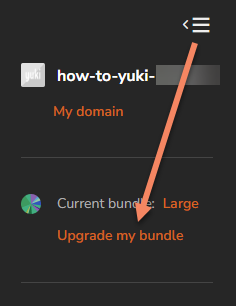
Click the three-line icon in the upper left corner of your Yuki environment and select Upgrade my bundle:
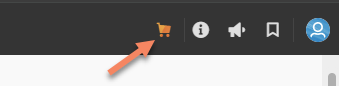
Or click the shopping cart icon in the upper right corner to navigate directly to the Yuki Store.
Once in the Yuki Store, you can select the Large bundle and complete your order.
PLEASE NOTE!
If you upgrade your bundle via the Yuki Store, the new bundle becomes active immediately.
If you downgrade before the 25th of the month, the selected bundle will become active on the first day of the following month.
If you downgrade on or after the 25th, the bundle will become active on the first day of the month after next.
Example 1: Downgrade on March 24 from the Medium bundle to the Small bundle
The downgrade takes effect at the end of March, and the Small bundle starts from April.
Example 2: Downgrade on March 25 from the Medium bundle to the Small bundle
The downgrade takes effect at the end of April. You will continue using the Medium bundle throughout April and will be billed accordingly.
From May onwards, the Small bundle pricing will apply to your invoice.