What is the Unlimited Bundle?
Modified on Thu, 1 Oct at 10:15 AM
Does your company process more than 200 purchase and sales invoices per month?
Then our Unlimited bundle can help you manage your administration as efficiently as possible. This bundle includes the following features:
Unlimited processing of purchase and sales invoices per month
Purchase invoices also include documents booked as Expense Declarations.
Sales invoices also include invoices created via the Yuki Invoice feature or imported into your Yuki environment through an API connection.
1 user included
Additional users can be added at €7.50 per user per month.
Communication with your accountant via Yuki Questions
Submission of documents and transactions through various channels (Mailbox tile)
Access to your digital archive (Archive tile)
Financial monitor with detailed drill-down functionality (Accounting tile)
Management of your outstanding suppliers and customers
Overview of your bank accounts (Bank tile)
Automated payments (via the Bank tile, Payment list option)
Creation of sales invoices (Sales tile)
Creation of quotations (Sales tile)
Payments via Mollie (Mollie integration)
Automatic invoice reminders (Settings tile, Reminder settings)
Projects (Projects tile)
Workflow management (Archive tile)
Direct debit of sales invoices (Bank tile)
Analytical accounting setup and management (Accounting tile)
Use of the Yuki Assistant App
The Unlimited bundle can be activated for €175 per month.
Note: Starting from January 1, 2027, we will implement a price adjustment for Yuki bundles. The updated prices can be found on this page.
How can you activate a bundle?
Important: Only a user with the role ‘Management’ can complete an order in the Yuki Store.
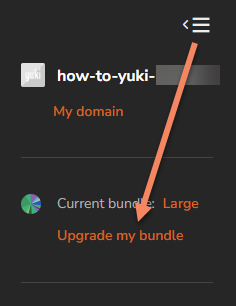
Click the icon with the three lines in the top left corner of your Yuki environment and then select Upgrade my bundle:
Or click the shopping cart icon at the top right to navigate directly to our Yuki Store:

In the Yuki Store, select the Unlimited bundle and complete your order.
PLEASE NOTE!
If you upgrade via the Yuki Store, the chosen bundle becomes active immediately.
If you downgrade before the 25th of the month, the new bundle becomes active on the first day of the next month.
If you downgrade on or after the 25th of the month, the bundle becomes active on the first day of the following month.
Example 1: Downgrade on March 24 from the Medium bundle to the Small bundle.
The downgrade takes effect at the end of March, meaning you will have the Small bundle from April onward.
Example 2: Downgrade on March 25 from the Medium bundle to the Small bundle.
The downgrade takes effect at the end of April. You can still use the Medium bundle during April and will be billed for it. From May, the Small bundle price will apply to your invoice.
Want to learn more about our bundles? Click here for our FAQs!