VISMA .NET zei:
ATTENTION!
Coordinate the use of the payment list carefully with your accountant. Discuss how to use it together so you can always pay your invoices on time.
Yuki Payment List is only available when a user with the Management role has selected the Small, Medium, Large, or Unlimited bundle via the Yuki Store in the domain.
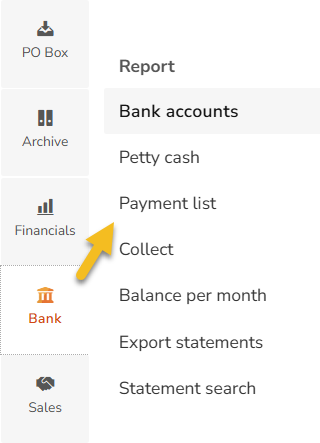
Good to know: the SEPA payment files generated from Yuki comply with the ISO 20022 standard. No additional settings or adjustments are required in Yuki.You can find the payment list by going to Bank and then selecting Overview – Payment list from the submenu.
VISMA .NET zei:
VISMA .NET zei:
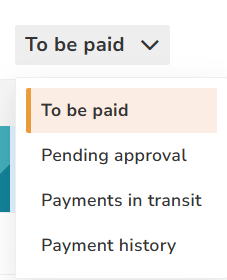
- To be paid
All purchase invoices, sales credit notes, expense claims, and/or payslips appear here if they have been recorded with the payment method Bank transfer or To be refunded for sales credit notes. You start from this overview to create a payment file. - Waiting for approval
If you are using payment list authorization, all documents will appear under Waiting for approval so that the designated user role can release the invoices for payment. Once approved, the invoices will move to the To be paid overview. - In progress
When you have finalized a SEPA payment file, all included documents will receive the status In progress and can be found under this level. As soon as the corresponding bank transactions are received and matched with the outstanding documents, they will disappear from this overview. - Payment history
Here you can view all finalized or draft payment files.
If the payment list authorization is not enabled, only users with the role of Management, Financial administration, or External accountant can create, edit, and finalize SEPA payment files.
A Back Office employee can only create a draft SEPA payment file.
If the payment list authorization is enabled, a Back Office employee will no longer be able to create drafts. The ability to create, edit, and finalize payment files will then be limited to the users you have assigned for this purpose.